[gtranslate]

Leverage Storman integration directly from your website

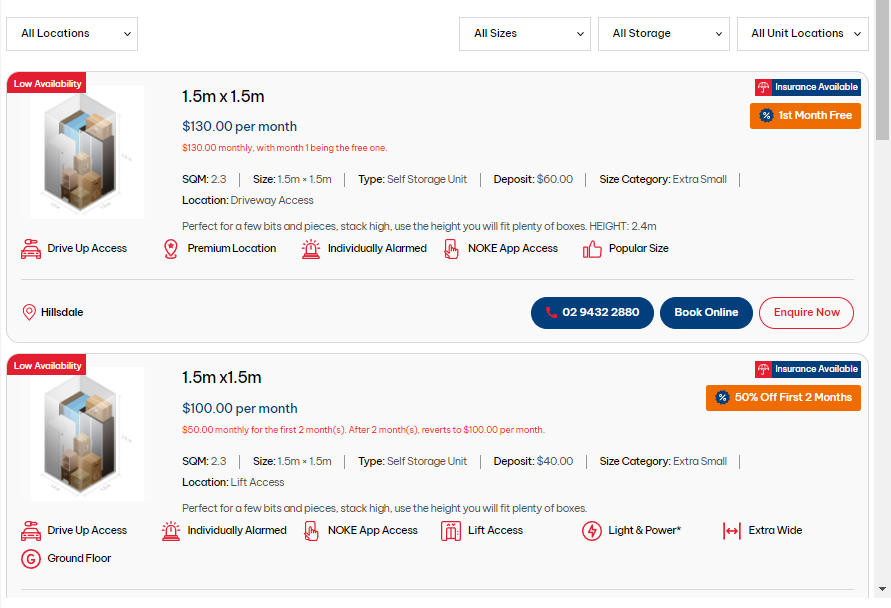
Not ready for a new website but still want to leverage our powerful StorNow technology with Storman integration? With a StorNow Embed page, you can enhance the customer journey that will generate more leads and online move-ins and can seamlessly be integrated into your existing website.

Additionally, you can easily change prices, add promotions, edit unit type descriptions, add images and more on your website-
all from within Storman.

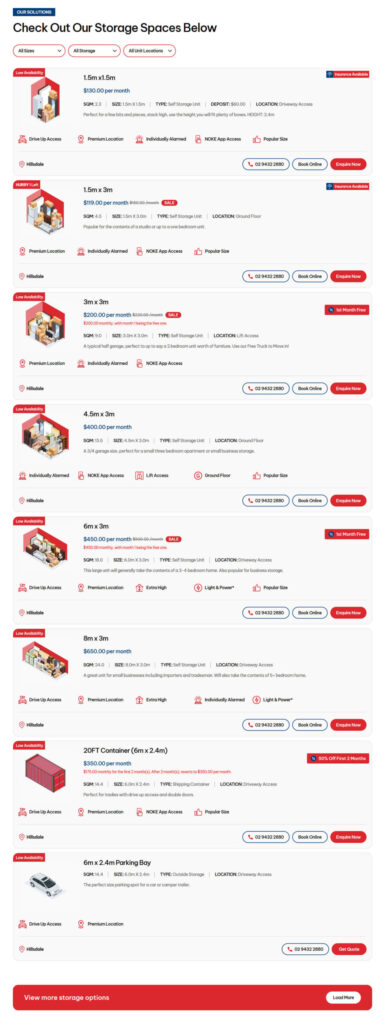
List View
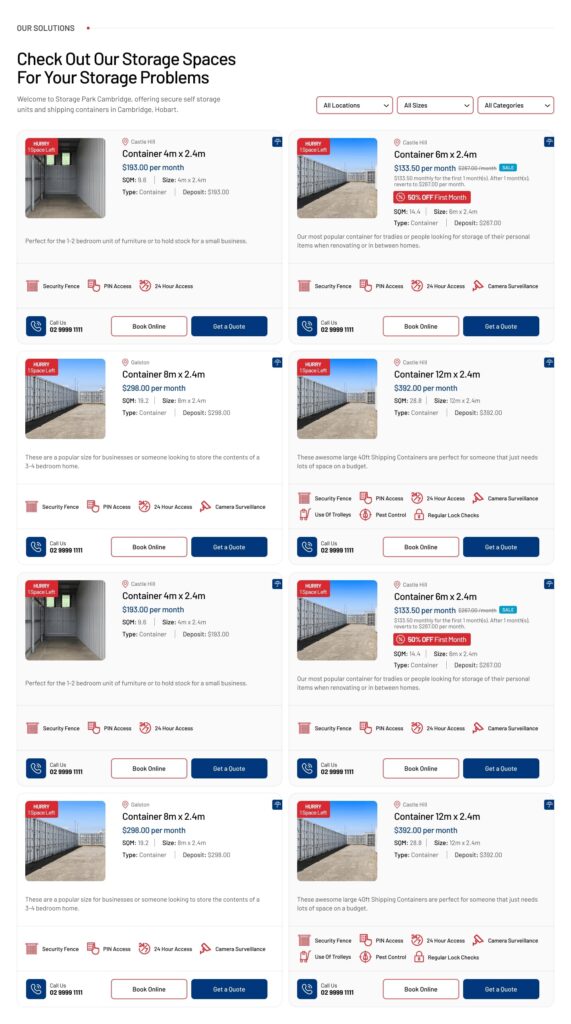
Grid View
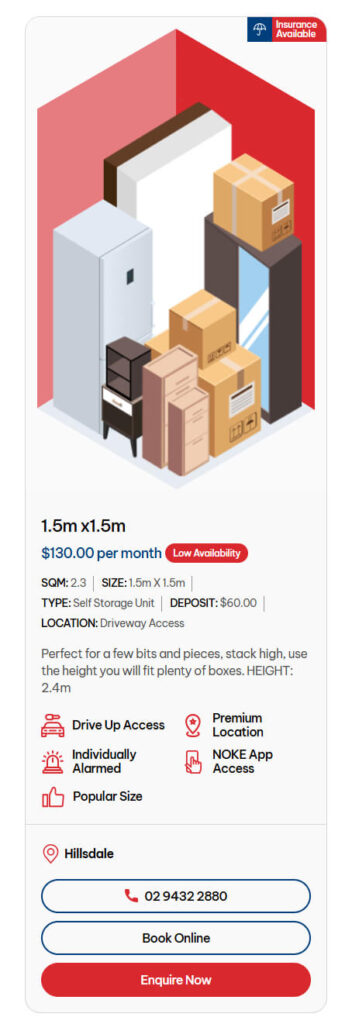
List View
(With Image on Mobile)
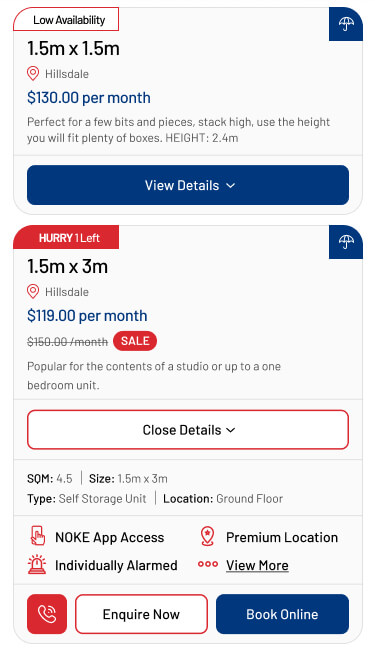
List View
(Without Image on Mobile)

Turn No Vacancy into a booking!

The embed page will show units with no vacancy and will allow the customer to still enquire on that size. This means that instead of losing a potential booking, you can do one of two things: Work with the customer to get them into a different size at the same or similar price of the unit that they needed. Place them on a waiting list which will allows customer follow-up once there is a unit of that size available.

Easily capture every lead and booking that comes across your website.

Are you still using a combination of online forms and phone calls to manage enquiries and bookings? As competition grows, you want to capture every lead and booking that comes across your website. Imagine letting your customers enquire and book in real-time – no calls, no emails, just a seamless online experience recorded through to your Storman instance.
Improved Efficiency.
No more manual updates! Real-time availability means less time managing the website and more time running the business.
Enhanced Customer Experience.
Customers can instantly check availability and reserve their unit, boosting customer satisfaction and encouraging advance bookings.
Increased Flexibility.
The customer signs up for the unit & pays the first month. Storman then postdates the move-in seamlessly and sends a summary email so the operators don’t miss a thing. Now, you can enjoy a day off!

Case Studies

Don’t just take our word for it!

Got a Question? Get your answers

What is a StorNow Embed page?
The StorNow Embed Page is designed to be inserted into your existing website and provides a proven Self Storage Customer Journey that leads to higher quality leads and more move-ins.
How does it look on different devices?
Just like our websites, the StorNow Embed Page not only looks great on desktop and mobile devices but is also optimised for both speed and functionality.
Is there support available?
Yes, support is available 7 days a week.
Can you insert a StorNow Embed Page into any website?
Yes a StorNow Embedded Page easily be inserted into any website by your current website provider.
How does it work with my current systems?
The StorNow Embed Page fits into your current website and is fully integrated with Storman, allowing you to drive demand and more move-ins with easy-to-use price, availability, and promotion tools all in one place.
Why choose a StorNow Embed Page?
At StorNow, we focus on the customer journey and maximising conversion rates. Our platform provides clear, well-laid-out information and caters to all types of customers. Whether customers want to sign up online immediately or prefer to speak to someone first, we make it easy with multiple Call To Action strategies.
Is there training provided?
Yes, we offer personalised one-on-one training during the setup process to ensure you get the most out of the StorNow Embed page. Even after you’re up and running, feel free to reach out to us for help—we know lots of little tricks to drive demand.

Keen to have a peek at how Storman Cloud can help you grow your self storage business?

storman move-ins offers three ways for storage facilities to sign customers up online.

Storman takes the guesswork out of running your facility, providing you with seamless automation, intuitive management, and powerful integrations—so you can focus on growing your business, not manual admin. Choose and use the ways that work best for your business - choose one, two or all three of the options below;
Sign-up at home.
After communicating with a customer and vetting their exact needs, staff can create a reservation in Storman and send an email or SMS that contains the ‘signup at home’ link.

When the customer clicks on this link they are taken to Storman Portal - our online signup process - their units are displayed and any details that have already been captured at the reservation stage are retrieved and displayed. The customer just fills in the blanks, reads and accepts the terms & conditions, and then e-signs on the screen!
Sign-up in store.
Storman Portal's signup process can be used on an iPad, tablet or dedicated computer at the front desk – this is a time saver and removes the need for double data entry (where the customer fills out paperwork, and you enter it into your storage management software). Once you understand their needs and have created a reservation – just give them an iPad and they can take care of the rest! Your agreement is created and stored in Storman Cloud automatically, and Storman can even automatically create and send your storer a gate access PIN.
Sign-up from your website.
You may choose to let customers sign up directly from your website – simply add a link to your online portal to your website’s menu! You can configure the system so that the customer must upload a photo of themselves and a copy of their ID with a manual approval process by staff, for security purposes. This is a popular option for automated or unmanned sites! As with all Storman Move-ins options, your agreement is created and stored in Storman Cloud automatically. Storman can also create and send your storer a gate access PIN – without you lifting a finger.

storman move-ins offers three ways for storage facilities to sign customers up online.

Storman takes the guesswork out of running your facility, providing you with seamless automation, intuitive management, and powerful integrations—so you can focus on growing your business, not manual admin. Choose and use the ways that work best for your business - choose one, two or all three of the options below;
Sign-up at home.
After communicating with a customer and vetting their exact needs, staff can create a reservation in Storman and send an email or SMS that contains the ‘signup at home’ link.

When the customer clicks on this link they are taken to Storman Portal - our online signup process - their units are displayed and any details that have already been captured at the reservation stage are retrieved and displayed. The customer just fills in the blanks, reads and accepts the terms & conditions, and then e-signs on the screen!
Sign-up in store.
Storman Portal's signup process can be used on an iPad, tablet or dedicated computer at the front desk – this is a time saver and removes the need for double data entry (where the customer fills out paperwork, and you enter it into your storage management software). Once you understand their needs and have created a reservation – just give them an iPad and they can take care of the rest! Your agreement is created and stored in Storman Cloud automatically, and Storman can even automatically create and send your storer a gate access PIN.
Sign-up from your website.
You may choose to let customers sign up directly from your website – simply add a link to your online portal to your website’s menu! You can configure the system so that the customer must upload a photo of themselves and a copy of their ID with a manual approval process by staff, for security purposes. This is a popular option for automated or unmanned sites! As with all Storman Move-ins options, your agreement is created and stored in Storman Cloud automatically. Storman can also create and send your storer a gate access PIN – without you lifting a finger.

storman move-ins offers three ways for storage facilities to sign customers up online.

Storman takes the guesswork out of running your facility, providing you with seamless automation, intuitive management, and powerful integrations—so you can focus on growing your business, not manual admin. Choose and use the ways that work best for your business - choose one, two or all three of the options below;
Sign-up at home.
After communicating with a customer and vetting their exact needs, staff can create a reservation in Storman and send an email or SMS that contains the ‘signup at home’ link.

When the customer clicks on this link they are taken to Storman Portal - our online signup process - their units are displayed and any details that have already been captured at the reservation stage are retrieved and displayed. The customer just fills in the blanks, reads and accepts the terms & conditions, and then e-signs on the screen!
Sign-up in store.
Storman Portal's signup process can be used on an iPad, tablet or dedicated computer at the front desk – this is a time saver and removes the need for double data entry (where the customer fills out paperwork, and you enter it into your storage management software). Once you understand their needs and have created a reservation – just give them an iPad and they can take care of the rest! Your agreement is created and stored in Storman Cloud automatically, and Storman can even automatically create and send your storer a gate access PIN.
Sign-up from your website.
You may choose to let customers sign up directly from your website – simply add a link to your online portal to your website’s menu! You can configure the system so that the customer must upload a photo of themselves and a copy of their ID with a manual approval process by staff, for security purposes. This is a popular option for automated or unmanned sites! As with all Storman Move-ins options, your agreement is created and stored in Storman Cloud automatically. Storman can also create and send your storer a gate access PIN – without you lifting a finger.

storman move-ins offers three ways for storage facilities to sign customers up online.

Storman takes the guesswork out of running your facility, providing you with seamless automation, intuitive management, and powerful integrations—so you can focus on growing your business, not manual admin. Choose and use the ways that work best for your business - choose one, two or all three of the options below;
Sign-up at home.
After communicating with a customer and vetting their exact needs, staff can create a reservation in Storman and send an email or SMS that contains the ‘signup at home’ link.

When the customer clicks on this link they are taken to Storman Portal - our online signup process - their units are displayed and any details that have already been captured at the reservation stage are retrieved and displayed. The customer just fills in the blanks, reads and accepts the terms & conditions, and then e-signs on the screen!
Sign-up in store.
Storman Portal's signup process can be used on an iPad, tablet or dedicated computer at the front desk – this is a time saver and removes the need for double data entry (where the customer fills out paperwork, and you enter it into your storage management software). Once you understand their needs and have created a reservation – just give them an iPad and they can take care of the rest! Your agreement is created and stored in Storman Cloud automatically, and Storman can even automatically create and send your storer a gate access PIN.
Sign-up from your website.
You may choose to let customers sign up directly from your website – simply add a link to your online portal to your website’s menu! You can configure the system so that the customer must upload a photo of themselves and a copy of their ID with a manual approval process by staff, for security purposes. This is a popular option for automated or unmanned sites! As with all Storman Move-ins options, your agreement is created and stored in Storman Cloud automatically. Storman can also create and send your storer a gate access PIN – without you lifting a finger.

storman move-ins offers three ways for storage facilities to sign customers up online.

Storman takes the guesswork out of running your facility, providing you with seamless automation, intuitive management, and powerful integrations—so you can focus on growing your business, not manual admin. Choose and use the ways that work best for your business - choose one, two or all three of the options below;
Sign-up at home.
After communicating with a customer and vetting their exact needs, staff can create a reservation in Storman and send an email or SMS that contains the ‘signup at home’ link.

When the customer clicks on this link they are taken to Storman Portal - our online signup process - their units are displayed and any details that have already been captured at the reservation stage are retrieved and displayed. The customer just fills in the blanks, reads and accepts the terms & conditions, and then e-signs on the screen!
Sign-up in store.
Storman Portal's signup process can be used on an iPad, tablet or dedicated computer at the front desk – this is a time saver and removes the need for double data entry (where the customer fills out paperwork, and you enter it into your storage management software). Once you understand their needs and have created a reservation – just give them an iPad and they can take care of the rest! Your agreement is created and stored in Storman Cloud automatically, and Storman can even automatically create and send your storer a gate access PIN.
Sign-up from your website.
You may choose to let customers sign up directly from your website – simply add a link to your online portal to your website’s menu! You can configure the system so that the customer must upload a photo of themselves and a copy of their ID with a manual approval process by staff, for security purposes. This is a popular option for automated or unmanned sites! As with all Storman Move-ins options, your agreement is created and stored in Storman Cloud automatically. Storman can also create and send your storer a gate access PIN – without you lifting a finger.

storman move-ins offers three ways for storage facilities to sign customers up online.

Storman takes the guesswork out of running your facility, providing you with seamless automation, intuitive management, and powerful integrations—so you can focus on growing your business, not manual admin. Choose and use the ways that work best for your business - choose one, two or all three of the options below;
Sign-up at home.
After communicating with a customer and vetting their exact needs, staff can create a reservation in Storman and send an email or SMS that contains the ‘signup at home’ link.

When the customer clicks on this link they are taken to Storman Portal - our online signup process - their units are displayed and any details that have already been captured at the reservation stage are retrieved and displayed. The customer just fills in the blanks, reads and accepts the terms & conditions, and then e-signs on the screen!
Sign-up in store.
Storman Portal's signup process can be used on an iPad, tablet or dedicated computer at the front desk – this is a time saver and removes the need for double data entry (where the customer fills out paperwork, and you enter it into your storage management software). Once you understand their needs and have created a reservation – just give them an iPad and they can take care of the rest! Your agreement is created and stored in Storman Cloud automatically, and Storman can even automatically create and send your storer a gate access PIN.
Sign-up from your website.
You may choose to let customers sign up directly from your website – simply add a link to your online portal to your website’s menu! You can configure the system so that the customer must upload a photo of themselves and a copy of their ID with a manual approval process by staff, for security purposes. This is a popular option for automated or unmanned sites! As with all Storman Move-ins options, your agreement is created and stored in Storman Cloud automatically. Storman can also create and send your storer a gate access PIN – without you lifting a finger.

storman move-ins offers three ways for storage facilities to sign customers up online.

Storman takes the guesswork out of running your facility, providing you with seamless automation, intuitive management, and powerful integrations—so you can focus on growing your business, not manual admin. Choose and use the ways that work best for your business - choose one, two or all three of the options below;
Sign-up at home.
After communicating with a customer and vetting their exact needs, staff can create a reservation in Storman and send an email or SMS that contains the ‘signup at home’ link.

When the customer clicks on this link they are taken to Storman Portal - our online signup process - their units are displayed and any details that have already been captured at the reservation stage are retrieved and displayed. The customer just fills in the blanks, reads and accepts the terms & conditions, and then e-signs on the screen!
Sign-up in store.
Storman Portal's signup process can be used on an iPad, tablet or dedicated computer at the front desk – this is a time saver and removes the need for double data entry (where the customer fills out paperwork, and you enter it into your storage management software). Once you understand their needs and have created a reservation – just give them an iPad and they can take care of the rest! Your agreement is created and stored in Storman Cloud automatically, and Storman can even automatically create and send your storer a gate access PIN.
Sign-up from your website.
You may choose to let customers sign up directly from your website – simply add a link to your online portal to your website’s menu! You can configure the system so that the customer must upload a photo of themselves and a copy of their ID with a manual approval process by staff, for security purposes. This is a popular option for automated or unmanned sites! As with all Storman Move-ins options, your agreement is created and stored in Storman Cloud automatically. Storman can also create and send your storer a gate access PIN – without you lifting a finger.
This site is registered on wpml.org as a development site. Switch to a production site key to remove this banner.